Backup your data before update IOS
How to make a complete iPhone backup before iOS 13 update.

Introduction
Keeping your Apple device software up to date is important not only because of all the cool new features we have been getting in the updates, but also because of all the security updates Apple has been making, most recently a “Sign-In with Apple” option to streamline and secure interfaces with websites and apps. Find out what’s new in iOS 13 >
However, there is always a risk of data loss when upgrading system software. Therefore, it’s important to backup before upgrading your iPhone or iPad. This article takes you through the steps on how to backup *everything* on your iOS device.
Step One: Do a Data Backup in iTunes.
First, let’s perform a backup of your iPhone configuration and other data. This will back up your iPhone settings and App data to your PC.
- Start iTunes
- Connect your iPhone.
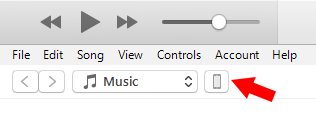
- Click the device icon in iTunes..
.
- In the Backups section click the “Back Up Now” button…
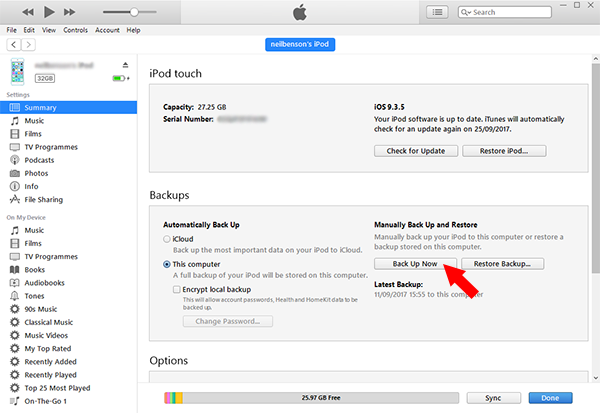
This will start the backup process. Depending on how many apps you have on your iPhone – this can take a little while. Once it’s finished you’ll have a full backup of your iPhone configuration and App data.
